Powered by Blogger.
Showing posts with label VS.. Show all posts

4 of the best lock apps for Android

Tuesday, May 2, 2017

We decided to present you probably the 3 best Android app lockers at this moment. Why? Because, lock Android apps are very necessary tools for protection. They can protect you from anybody who tries to enter your private apps and widgets like text messages, Skype, WhatsApp, your photos etc. It’s a smart thing having this kind an app on your phone.

AppLock : Fingerprint & Pin

If you want simplicity and functionality, opt in for this great applocker. Light and simple, it will offer you great locking features, and even a fake crash. You can lock any app you like to lock and you can even lock the app itself to protect anyone from entering.

You can disable the app with one app and setup your own fingerprint, pins and patterns. Light, free and extremely helpful!


Google Play Download Link: AppLock : Fingerprint & Pin

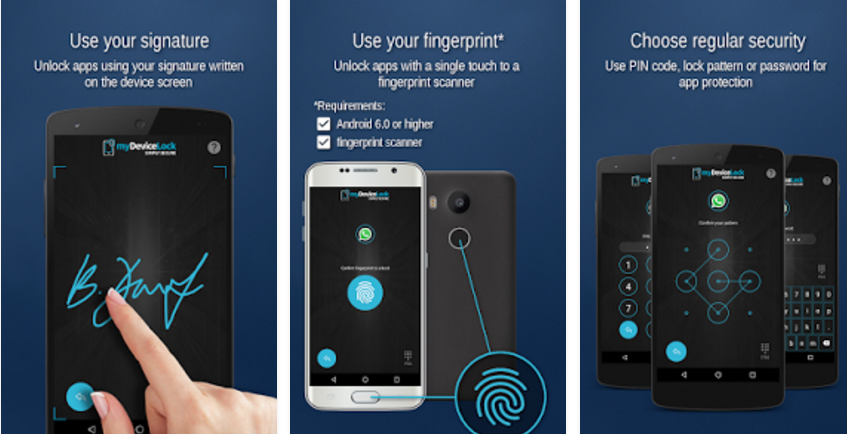
myDeviceLock Biometric AppLock


myDeviceLock Biometric App Lock is a powerful, sleek and ultra-helpful app locker app that can help anyone on long term with 5 different app locking methods. From signature and code, to pattern and biometric app lock, the app offers multiple options that offer probably the best app locking from all of these similar apps.

It's key features are making it one of the fastest growing apps on Google Play. with more locking methods than any other mobile security solution on the Google Play market, including biometric app lock, this should be one of your top solutions.

Google Play Download Link: myDeviceLock Biometric AppLock

Smart App protector


On the other hand, Smart App protector is a bit more complicated then App Lock, but it offers little more features than App lock. One cool feature is that they offer gesture lock, apart from the standard number and pattern lock.

Also it can prevent your screen from turning off when selected app is still running and it can prevent your screen from auto-rotating.

Some other additional features are: app lock time feature, unlock attempt to limit and the additional locks to your wi-fi, 3G, outgoing calls and USB connection.

But this app has some flaws also. First It informs you to install another app called “Helper” which will help you Smart App protector to not be force closed from your phone Task Manager. So yes, you have to install it, because the app crashes if you don’t.

Also they didn’t have to put the installed applications manager, because not only your Android already has this feature, but most of the Android assistant and boosters already got this feature.

the cool gesture lock feature
Proof that you have to install another app 


Google Play Download Link: Smart App Protector

APP Lock


We have been using this app for long time. It’s one of the best apps on Google Play. It’s so simple and fast, and yet so useful. App Lock enables you to lock any app on your smartphone. You can do that when you open the app, just choose the app you want to lock, and tap to right. Also APP Lock offers the feature of locking incoming calls.

The menu is so simple and user friendly. You can lock all apps, search for specific app, choose number lock or pattern lock, or change the security question. Here is screen shot from my phone with some info.


Google Play Download Link: APP Lock

Sleep as Droid VS. SleepBot – Improve your sleeping with these quality sleep trackers

Thursday, August 1, 2013

If you are one of those people that want to improve and follow their sleeping, than this sleep trackers are interesting solution if you have an Android device. Sleep as Droid and SleepBot are probably the best sleep related apps on Google Play.

Sleep as Droid


Sleep as Droid will basically follow all of the activity in your sleep. This app uses inertial sensor in your device in order to sense when you have light sleep or when you are in a deep sleep. Thus, the app tends to not wake you while you are in a deep sleep. For example if you set the alarm from 8am to 8:30am, it will wake you in the most optimal moment, not while you are in your deep sleep, but when you start rustling around and moving. This will actually make you feel less groggy and fresher when you wake up.

Sleep as Droid will record any snoring, talking or noise that you make while you sleep, as well. For every sleep there is a graph which shows how your sleeping went. You can hear every bigger noise you’ve made, if you are interested in what you are talking and how much are you snoring. There is also interesting selection of alarms to wake you up and reminders for going to sleep.

But, there are few things that I didn’t like about this app. The UI is not good, everything is little messy and simply this is not well organized and user friendly app. Also, Sleep as Droid is not free, after 14 days you will have to buy it.

Google Play Download Link: SLEEP AS DROID

Sleep Bot


Compared to Sleep as Droid, Sleep Bot has too many less reviews and downloads. However, that doesn’t mean that it is not better or more quality. Sleep Bot has the same features as Sleep as Droid. It will record sounds, track movements, offer you different alarms, and remind you when to go to sleep. Like Sleep as Droid it has graphs that will show you when you’ve made noises.

The UI is amazing, I fell in love with the colors, smoothness and the whole organization of the features. I also liked how the app informs you which foods are good to eat to make you sleep and which foods or drinks are good to keep you awake.
Google Play Download Link: SLEEP BOT

Verdict: SleepBot

To be real, these 2 apps are quality and they will do their work, no matter which one you select. However, the better UI, design and the fact that is free are the reasons why I will keep SleepBot on my Android devices.


Teamviewer vs Splashtop 2 – the best free remote control apps on Google Play

Sunday, June 9, 2013

There are a few similar remote apps on Google Play, but these 2 remote control apps for Android are probably the best. So, we are going to present their features and how to install them, and you decide which you are going to use.

TeamViewer

Screenshot of my desktop from Teamviewer for Android

TeamViewer is practically the best software for remote computer access and control. This software also enables desktop sharing, online meetings, web conferencing and file sharing. It was established back in 2005 in Germany, so it already has history and authority in the computer world.

The Android app of TeamViewer is equally good and quality as the computer software. It has around 10 million downloads and great average rating of 4.7.

Setting up TeamViewer is easy. You need to install the PC version, which probably most of you have done it (if not go to http://www.teamviewer.com) . Then you need to install the Android app. After you open the app you’ll need to enter the ID and the Password from your computer’s Team Viewer, and that’s it. You can now easily and flawlessly control your computer via your Android device.

I’ve been using TeamViewer for Android for several months and I’ve never had any problems. It is a reliable app that gave me the opportunity to give great help to some of my friends, while I wasn't home. 

Google Play Download Link: TEAMVIEWER 

Splashtop 2

Screenshot of my desktop taken from Splashtop2

Splashtop2 is another great desktop remote app that was praised by many media, including New York Times and Cnet.  That is all deserved because the app is great.  It is very similar to TeamViewer so lets  see how to install it and what it can do for you.

First you need to download the computer software that you can find here - http://www.splashtop.com/splashtop2. Then you’ll need to register, which bugged me a little. But, I’ve done the registration very fast. It is an email and password registration with no confirmation emails or other annoying moments. After that you’ll need to login, and then install the Android app. You’ll need to login there as well and after that you can access your computer.

My experience with Splashtop2 was good. Splashtop2 is more responsive to touches, you can easily move through your desktop with your fingers. But controlling the Windows narrow is harder and I had problems with closing and opening applications. Basically I had to zoom a lot of times in order to choose or close some files. However, I was using Windows 7, but on Windows 8 I think that Splashtop2 would be much more useful.

Google Play Download Link: SPLASHTOP 2

Choosing any of these apps isn’t a mistake. I would recommend however to use Team Viewer on any Windows other than Windows 8, and to use SplashTop2 only with Windows 8, because it is very responsive and supports Windows 8 gesture support.

Shazam vs. SoundHound

Wednesday, April 17, 2013

Shazam and SoundHound are probably the best music identification services.  They are available for various platforms and they are practically giants in music identification category. We tried to identify many random songs using this apps. So let’s see, SoundHound or Shazam?

Test 1

M83 – Midnight City (Eric Prydz Private Remix)


screenshot of SoundHound and Shazam on my phone


We intentionally played a part of the song where there are no lyrics and we searched for a remix. SoundHound guessed the right song. Shazam gave a result faster, but it gave the original song by M83, not the remix by Eric Prydz that we searched for.

Test 2

Aire – Los Cafres


screenshot of SoundHound and Shazam on my phone


We randomly found this song on YouTube. Later we found out that Los Cafres are Argentinian reggae band. Anyway, Shazam found the song fast and gave correct results, but SoundHound didn’t find any results at all.--> -->

Test 3

Mantovani – Maria, Elena


screenshot of SoundHound and Shazam on my phone


Both SoundHound and Shazam gave fast, correct results on this instrumental song.

Test 4

Zdravko Colic – Ti mozes sve, al’ jedno ne


screenshot of SoundHound and Shazam on my phone

Zdravko Colic is maybe the biggest music star on the Balkans. We tried to identify one of his biggest hits, “Ti mozes sve, al’ jedno ne” which is singed on Serbian Language and only Shazam found the song.

Test 5 

Notorious B.I.G – The world is filled ..


screenshot of SoundHound and Shazam on my phone


Both SoundHound and Shazam gave fast and correct results of this hip hop classic performed by Biggie.

Our Verdict: Shazam


It’s a close call, but we also tried to identify many other songs, and it seems that Shazam could identify any song, from various countries, which SoundHound couldn’t. Although SoundHound has much more cooler design, Shazam will always be my first choice.

You may also want to check out Google Sound Search which threatens to become great competitor to Shazam and SoundHound. Too bad is only available in the United States.


Flipboard vs. Pulse

Wednesday, April 10, 2013

In this app battle we decided to oppose two great news reader apps, Flipboard and Pulse. The best free news reader apps for sure.


Dinner Spinner vs. Recipe Search

Monday, January 28, 2013

Dinner Spinner vs. Recipe Search, two of the best cooking and recipe apps on Google Play


As one of the best recipe apps out on Google Play, we decided to confront Dinner Spinner and Recipe Search. You can pack all of your notes and recipe books and throw them away. This recipes apps will help you cook anything you need and cook simple dinners using your smartphone only.

Dinner Spinner 

Dinner Spinner is an app developed from one of the biggest website for recipes out on the web – AllRecipes. The recipes are divided in numerous different categories, from vegetarian recipes, to Italian recipes. So, you can find all recipes from the website on theirs app, called Dinner Spinner.

First you got to choose what you are cooking, is what you cooking a desert, salad, side dish or main dish. Then you have the option to choose the ingredients you want your recipe to have. Also you can choose the time needed to cook the desert.

For example, we selected Main Dish, in which main ingredient will be pork, and with cooking time around 45 minutes. The app then will recommend recipes and will list them according to their ratings. So the best rated recipe is always first. The best rated recipe in our case was Bow Ties with Sausage, Tomatoes and Cream.

If you don’t know what you want to eat, just shake the phone and the app will recommend dish, ingredients cooking time of the recipe.

It is worth to mention that Dinner Spinner was listed in Time magazine’s top 50 apps of 2012.

Recipe Search 

Recipe Search is a product from another great recipe website, AllTheCooks . So the story is the same as Dinner Spinner, all recipes from the site can be found on the app. But, Recipe Search or Recipes, is a bit different from Dinner Spinner. First we like to mention, that we selected Recipe Search in our top 7 apps you must have. When you open the app, there are pictures from the top recipes of that day, which is kind of cool. If you swipe to right, then the main menu will pop out.

There you can search recipes with keywords or you can browse through numerous different categories. Also you can bookmark certain recipes, check what’s new or build a profile and post your own recipes, comment and review recipes.

When you choose a recipe there is a little description from the author, preparation time, and detailed ingredients. We also liked the detailed directions to cook the recipe. In addition, there are features like planning the recipe, add certain products you miss to cart and see nutrition facts about the dish you are about to eat. App is simple and easy to use.

Our verdict: Search Recipe. 

It was a close call. Both apps are great, but, although they offer similar features, we felt like the user interface and experience was slightly better on Search Recipe. We were not impressed by the “fun” feature on Dinner Spinner, where you can shake your phone and the app will recommend recipes. Two or three times the app didn’t find any possible matches.

We felt like Search Recipe is more serious, useful and organized.
 

Health & Fitness App of the Month - iEatz Healthy

Android Game of the Month - Hammerstorm

Medical App of the Month - AI Skin Analyzer

Medical App of the Month - AI Skin Analyzer
Analyze moles, rash, acne

Music App of the Month - OfflineTunes

Music App of the Month - OfflineTunes
The feature-rich offline music player for iPhone

Most Useful App of the Month - Habits

Business App of the Month - Career Booster

Photography App of the Month - SnapSign

Subscribe and get the best apps

Enter your email address:

Delivered by FeedBurner