Powered by Blogger.
Showing posts with label Software Review. Show all posts

Most Useful Software of the Week – DataTracks

Friday, May 11, 2018


Our choice for a Most Useful Software of the Week is called DataTracks, especially designed for investment firms, banks and insurance companies to get error-free regulatory reporting solutions with an ease. With tons of amazing features and simple-to-use, DataTracks is here to bring you a peace of mind.

Support Tool for Investment Firms, Banks & Insurance Companies – DataTracks

Friday, May 4, 2018


Support tool can be quite practical and helpful when it comes to making your job easier. When we talk about business and their needs, there are support tools that can be quite of use for helping businesses find the smartest solutions and fulfill their needs without much effort. If a business needs help with regulatory reports and looks for the right service to help him, we did our research and we have the right software for all businesses and their regulatory report needs. Let’s see what the service is all about.

Software Review - Persona Tool

Saturday, March 26, 2016


Have you ever heard the phrase: “Why hide my IP address? I have nothing to hide”. Be that as it may, each time you do something online, which is pretty much all the time, websites, advertisers, criminals, governments can, or may be, looking over your shoulder. Also, if you have the ability to change your IP address you will have the Internet working for your own needs.

Today we will present you a simple way to hide your IP and get lots of great additional features. Persona Tool is not a regular software for hiding IP (like there are tons available on the Internet). When we first saw and try it we loved the idea. The software acts like a browser in which you can create different profiles. Each profile can have it own dedicated IP and country. So, you can have your Canadian FB account, US Google and Twitter account or UK Netflix account.

Another cool thing is that the Persona Tool keeps all of your history for that particular profile. There are log files for each profile and you can easily delete or access them, the same goes with the history as well.

How and who can use it?

The software can be used by anyone who will pay the subscription. There is a 3-day testing period to see if the services is the right fit. When you download the software, you need to sign up and sign in with the credentials within Persona Tool. The browser used in Persona Tool is smooth, blazing fast and intuitive. Using it is a joy and the developers are constantly improving it with regular updates.

While the use of the software is mostly to protect user’s privacy, it can also be used for content marketing goals. For example you can use different profiles to post to forums, comment on Facebook or create interaction with your visitors and customers.

Every profile is manageable through the persona management tab within the browser. You can set up different countries to each profile and see statistics, history and log files for each of them. Currently there are somewhere around 15 different proxy locations, but the creators add different locations frequently so we guess this number will change in future (for example, they added another Netherlands proxy 4 days ago).

Persona Tool is a feature rich, quality and customizable software that can help anyone to hide IP. It is free for 3 days. Try it and never be exposed online again. 

Software Review Disk Xray

Saturday, September 12, 2015


Disk Xray is a Mac OS X software that can be used to speed up your Mac and make it more organized. It is a software that will give disk usage statistic like no other Mac software. On top of that it will help you find all duplicate files and folders. But, one of its best functions is the cleanup features. Having a great software like this one can definitely help you in situations where you need to manage huge amounts of data and simply want to avoid duplication or get rid of some unneeded files.
So, Disk Xray has 3 mean features/modules. 

Mac OS X Software Review - Viper FTP

Wednesday, September 2, 2015


Today we will present you a software for Mac OS X that will be perfect for users that transfer files by FTP, SFTP i.e people that maintain a website, upload documents or photos, or upload videos on YouTube. We are talking about the software called Viper FTP. It is a clean, easy, fast and effective way to transfer FTP files. It is a feature rich software that can enhance your user experience and your file management a truly enjoyable process.

Software Review - VDownloader

Monday, August 31, 2015


VDownloader is a software that will enable you easy download of any type of video that is available on the Internet. It is a simple, easy to use software for downloading videos, and we see great value for the end user, that is why we present it to you. Also, it is maybe one of the best software for downloading videos. The fact that it works for free and that it can download videos from most of the major websites makes it a great video downloader solution for any user.

Features and How to Use it

VDownloader works in simple manner. After you install it, you need to go to the desired website where the video is located. Right here we want to say that VDownloader works with most of the popular websites that play videos like YouTube, Vimeo, DailyMotion, LiveLeak, MTV etc.

You can easily search through the videos with the built in tool or you can also browse through the videos in the software. Of course you can search for videos in your desired browser as well. After you find the video, VDownloader enables one-click download. All you need to do is copy the URL into the software. Additionally, you can choose the video quality of the download. We always went with Full HD Videos and good the promised quality. It is as simple as that. The software is light, it runs fast and it doesn’t take too much of your RAM memory. It is easy to use with great intuitive UI.

Try it for free on the official VDownloader website. It is certainly a worthy download if you want to enjoy HD videos without pauses and awful commercials.

Software Review - iMap Builder

Monday, August 3, 2015


If you are searching for a software that will enable you to map selected locations and display them in any form, than search no more. The software that we will review today will enable you just that and it will enable you to do it in various customizable ways. We are talking about the amazing iMapBuilder Interactive Map Software, software that can be extremely useful to businesses.

Features

After you download it you can use it for free in order to see if its features are useful to you. You can later buy the full version with all the map software features.

The first feature that iMap will enable you is to add or import multiple locations. There are multiple cities already included in their list, so you can just select the cities. If you however don’t find your location, you can select plot points using latitude and longitude coordinates. You can use this to indicate your national stores or offices.

Yon also create Choropleth Map, which is map with different colors of different regions. These colors are often used to show some statistical data.

Of course you can create maps with legends and map with highlight. This are perfect to explain and describe the data used in the heat or highlighted map. You can easily annotate any map as well, putting names or any kind of letter.

The feature we liked the most is the draw route on a map feature. You can create travel routes or directions with ease. Thus you can connect different important locations on the map. What’s cool is that you can add map infowindow on any location. With the Infowindow you can describe or give additional information about any location. At the end you can not only add infowindows, but you can also create simple map charts that will contain different geographical data.

After you create any type of map you can easily share it anywhere. All you have to do is to get the embedded code. You can paste the embedded code on your website or blog and thus show your desired map to your readers and users. It is as simple as that.

Conclusion

iMap Builder enables multiple useful features from which businesses and content creators can only benefit from. With its intuitive UI and full featured software, you can easily create any type of map and present it on your readers, users and even business partners. Try iMap Builder for free and start benefiting from the creation of customizable maps today. 

Software review - Daihinia

Saturday, June 13, 2015


Daihinia is a tool for WiFi. It turns a simple Ad-Hoc network into a Multi-hop Ad-Hoc network. Multi-hop Ad-Hoc networks offer a higher level of flexibility than the usual Infrastructure Mode: in Infrastructure Mode all the computers have to be in the range of the Access Point, while in Multi-hop Ad-Hoc networks they have to be within one another's range, possibly forming chains longer than one hop.

Software Review - Spytector – Remote Key Logger

Tuesday, April 14, 2015


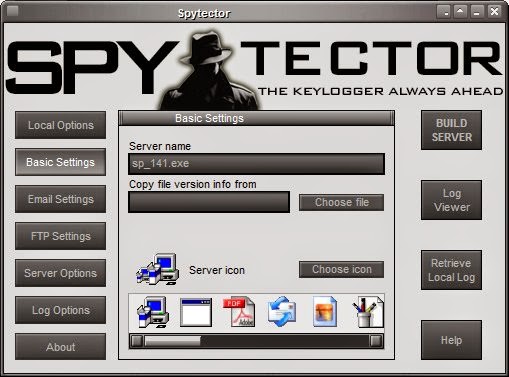
Spytector is a remote keylogger that will enable you one of the best possible remote surveillance that you can use to spy on your kids, spouse or employees. Basically, Spyector records every keystroke to an encrypted log file - while staying completely undetectable to users. In that way this surveliance tool will enable you to know what certain person is doing on a computer, without their knowledge.
 

House & Home App of the Month - Atelier Rose

Shopping App of the Month - WorthIt

Shopping App of the Month - WorthIt
Scan products to know the real value

Most Useful App of the Month - Habits

Subscribe and get the best apps

Enter your email address:

Delivered by FeedBurner